The Sample code
document.addEventListener('keydown', event => {
    if (event.ctrlKey && event.code === 'KeyB') {
        event.preventDefault();
        console.log('<Ctrl + B> pressed.');
    }
});
Break down the sample code
1. document.addEventListener(‘keydown’, event => { … });
- Use “keydown” event that is triggered when the key is pressed.
- “event” is an object of KeyboardEvent class.
See KeybordEvent – Web APIs
2. if (event.ctrlKey && event.code === ‘KeyB’) { … }
- This condition is to check if <Ctrl + B> were pressed.
- event.ctrlKey is a boolean property to determine the Ctrl key is pressed or not.
- event.code represents which key was pressed.
3. event.preventDefault();
- This method cancel the default behavior.
- With this method, pressing <Ctrl + B> will not trigger the browser’s default behavior, and only the script’s process will be executed.
KeybordEvent class properties
| Property | Type | Description | Example |
ctrlKey | boolean | Whether the Ctrl key is pressed | true / false |
| shiftKey | boolean | Whether the Shift key is pressed | true / false |
| altKey | boolean | Whether the Alt key is pressed | true / false |
| metaKey | boolean | Whether the Meta key (⌘ Cmd / Windows key) is pressed | true / false |
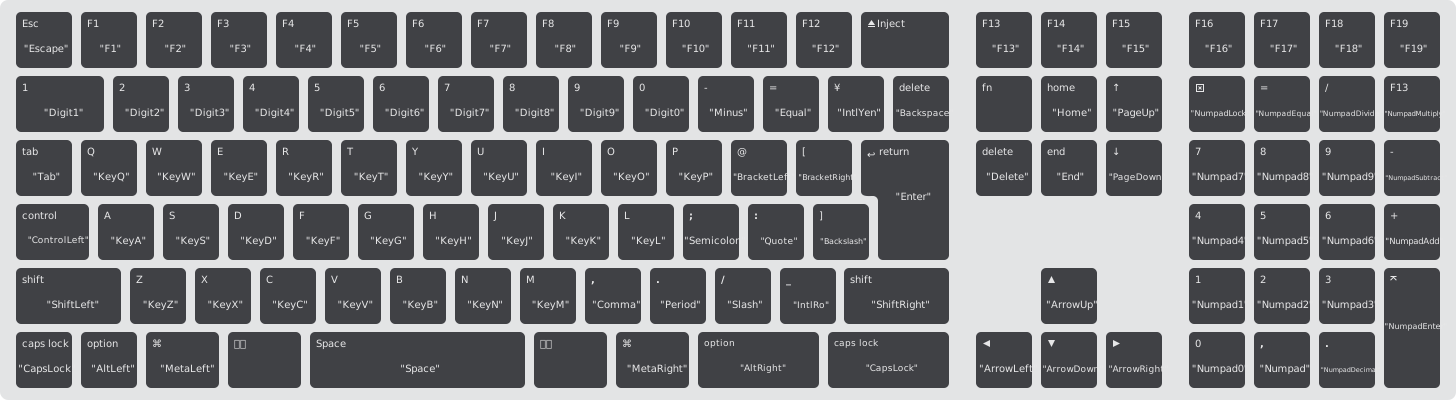
Keycode on keybord
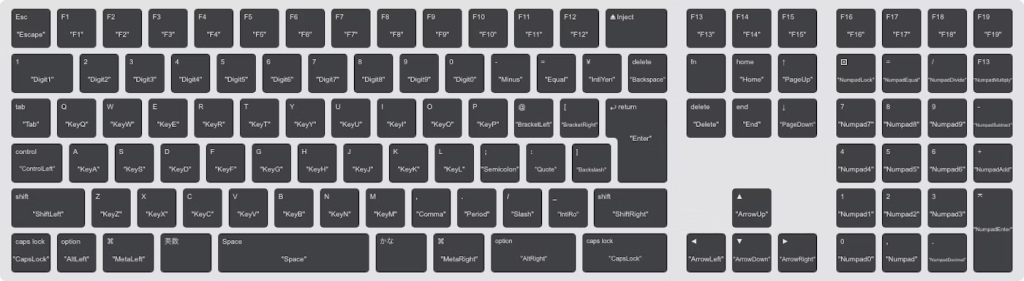
https://listful.vercel.app/asset/keyboard-A1843-EMC-3138.svg
 Journey of learning
Leave a comment